
Introduction
typeRun() is an enhanced version of typeR()
that not only simulates typing animation but also executes your
R code in real-time. This makes it perfect for:
- 🎓 Live teaching and workshops
- 🎤 Conference presentations
- 📹 Recording tutorials
- 🧪 Interactive demonstrations
Basic Usage
Simple Script Execution
The most basic usage is to run an R script with typing animation and live execution:
# Create a simple script
cat("# Data Analysis Demo
x <- 1:10
mean(x)
sum(x)
", file = "demo.R")

# Type and execute it
typeRun("demo.R")
What you’ll see:
- Code types out character by character
- Each line executes as it’s typed
- Results appear immediately after each command
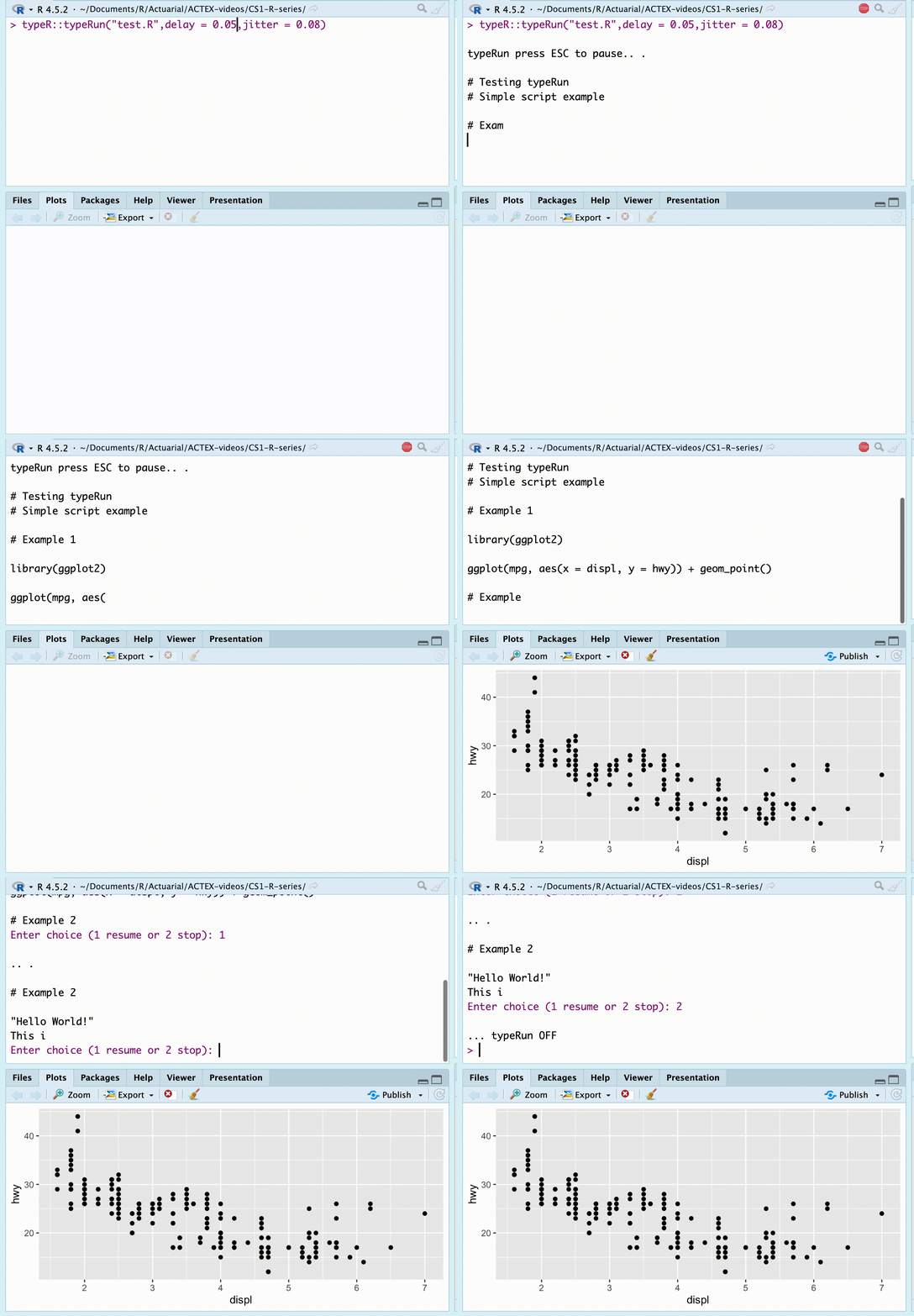
typeR::typeRun demo
Customizing the Experience
Working with Models
Linear Models
cat("
# Linear regression
model <- lm(mpg ~ hp + wt, data = mtcars)
summary(model)
", file = "model_demo.R")

typeRun("model_demo.R")
What happens:
-
model <- lm(...)executes silently (no output) -
summary(model)displays the full summary with coefficients, R-squared, etc.
GLM and Other Models
typeRun() handles all model types intelligently:
Statistical Tests
The typeRun() function properly displays statistical
test results using their formatted print methods:
library(typeR)

# Create a test script
cat('x <- rnorm(50, mean = 20, sd = 3)
tt <- t.test(x, alternative = "two.sided", conf.level = 0.95)
tt
', file = "test_ttest.R")

# Run it
typeRun("test_ttest.R", delay = 0.01)
This will display the t-test results in their proper formatted output:
    One Sample t-test

data:  x
t = 45.185, df = 49, p-value < 2.2e-16
alternative hypothesis: true mean is not equal to 0
95 percent confidence interval:
 18.68753 20.42711
sample estimates:
mean of x
 19.55732
The same applies to other statistical objects like
anova(), aov(), lm(), etc.
Interactive Control
Pause and Resume
During execution, you have full control:
- Press ESC (or Ctrl+C) to pause
- You’ll see:
Enter choice (1 resume or 2 stop): - Enter 1 to continue from where you paused
- Enter 2 to stop completely
typeRun("long_script.R")
# Press ESC while running
# Enter 1 to resume
# Or enter 2 to stop
This is perfect for:
- Answering questions during presentations
- Explaining specific code sections
- Debugging during demonstrations
Working with R Markdown and Quarto
Advanced Features
Suppressing Library Messages
Package loading messages are automatically suppressed:
cat("
library(ggplot2)  # No startup message shown
library(dplyr)    # Clean output

# But code works normally
mtcars %>% head()
", file = "packages.R")

typeRun("packages.R")
# Shows only the actual results, not package messagesPractical Examples
Teaching Linear Regression
cat("
# Load data
data(mtcars)
head(mtcars, 3)

# Visualize relationship
plot(mtcars$hp, mtcars$mpg,
     xlab = 'Horsepower',
     ylab = 'Miles per Gallon',
     main = 'MPG vs Horsepower')

# Fit model
model <- lm(mpg ~ hp, data = mtcars)
summary(model)

# Add regression line
abline(model, col = 'red', lwd = 2)

# Predictions
new_data <- data.frame(hp = c(100, 150, 200))
predict(model, new_data)
", file = "teaching_demo.R")

typeRun("teaching_demo.R", delay = 0.08)
Data Analysis Workflow
cat("
# 1. Load and explore
data <- iris
str(data)

# 2. Summary statistics
summary(data)

# 3. Visualization
boxplot(Sepal.Length ~ Species, data = data,
        main = 'Sepal Length by Species',
        col = c('lightblue', 'lightgreen', 'pink'))

# 4. Statistical test
aov_result <- aov(Sepal.Length ~ Species, data = data)
summary(aov_result)

# 5. Post-hoc test
TukeyHSD(aov_result)
", file = "analysis_demo.R")

typeRun("analysis_demo.R", delay = 0.06, max_print = 8)
GLM Demonstration
cat("
# Binary outcome: Manual transmission (am)
# Predictors: HP and weight

# Fit logistic regression
logit_model <- glm(am ~ hp + wt,
                   data = mtcars,
                   family = binomial(link = 'logit'))

# Model summary
summary(logit_model)

# Odds ratios
exp(coef(logit_model))

# Predicted probabilities
mtcars$pred_prob <- predict(logit_model, type = 'response')
head(mtcars[, c('am', 'hp', 'wt', 'pred_prob')])
", file = "glm_example.R")

typeRun("glm_example.R", max_print = 6)
Tips and Best Practices
3. Output Management
# Lots of output? Limit it
typeRun("demo.R", max_print = 5)

# Models in script? They'll show nicely
# Plots in script? They'll render silentlyTroubleshooting
Script Not Found
# Error: The file does not exist
typeRun("missing.R")

# Solution: Check file path
file.exists("demo.R")
list.files(pattern = "\\.R$")Comparison Table
| Feature | typeR() |
typeRun() |
|---|---|---|
| Typing animation | ✅ | ✅ |
| Code execution | ❌ | ✅ |
| Shows output | ❌ | ✅ |
| Interactive pause/resume | ❌ | ✅ |
| Output truncation | ❌ | ✅ |
| Custom environment | ❌ | ✅ |
| Model summary handling | N/A | ✅ |
| Library message suppression | N/A | ✅ |
See Also
-
?typeR- Basic typing animation without execution -
?typeRun- Full function documentation - Package website